Many organizations use Microsoft Intune for device management but lack an up-to-date and usable asset overview in TOPdesk. With the Microsoft Intune–TOPdesk integration, you can automatically synchronize assets from Intune to TOPdesk Asset Management and directly link them to the correct person (or department/organization). This way, you always know who is using which asset, without manual management!
Why this integration?
The main reasons to link Intune with TOPdesk are clear:
Your asset and relationship administration in TOPdesk is automatically organized and maintained
You prevent confusion about who has what (and since when)
You can advise, follow up, and replace faster
Changes are easy to implement
Ideally combined with onboarding/offboarding processes (for example, for replacement or onboarding/offboarding)
What exactly does the integration do?
The integration is a standard module within the Qixium platform and works directly with TOPdesk Asset Management. Basically, the link regulates:
Component | What happens |
|---|---|
Asset synchronization | Assets are automatically created and updated in TOPdesk based on Intune |
Template link | Device types (laptops, mobiles, etc.) are linked to the correct TOPdesk asset templates |
Field mapping | Intune fields are mapped to TOPdesk fields (expandable later) |
Search lists | Search lists (brands/categories) can be automatically expanded or standardized via value mapping |
Person link | Asset is linked to a person card based on UPN/email (or to department/organization for shared devices) |
Status & archiving | Devices that are no longer present or have not been seen for a long time are given a status or are (optionally) automatically archived |
Triggers & notifications | Triggers on new/changes/status/archiving with email and/or TOPdesk notification (depending on model) |
Want to know how this can be applied to your situation?
We would be happy to explain it, get in touch!
Frequently asked questions!
Can you determine which device types go to TOPdesk?
Yes. You choose which device types are processed and to which TOPdesk asset template they are linked.
What if a device is in Autopilot/Intune but not in TOPdesk?
New devices can be added to TOPdesk based on Autopilot. As soon as they “flush” into Intune, fields can be automatically supplemented further.
What if a device is no longer in Intune?
Then TOPdesk can be given a status value (e.g., “no longer in Intune”) and the asset can optionally be archived automatically. If the device returns later, it can become active again (history remains visible).
We have multiple names for the same brand, is that manageable?
Yes. In addition to automatically expanding search lists, there is value mapping (e.g., “HP”, “Hewlett Packard”, “HP Inc.” to one standard value in TOPdesk).
Business case: what does it yield?
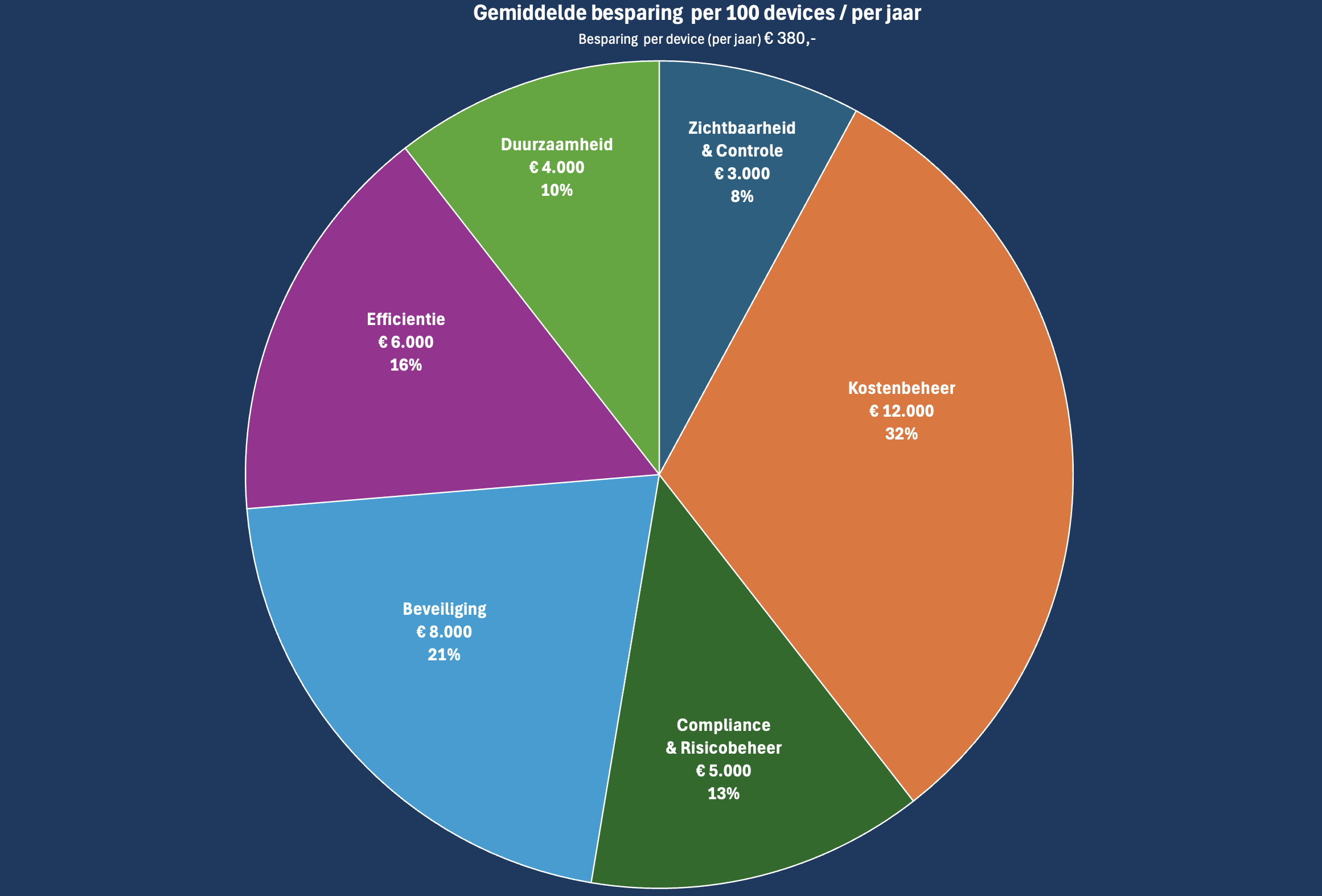
The figures relate to savings based on 100 devices. The average saving quickly amounts to €380 per device per year (with substantiation on themes such as cost management, compliance/risk, security, efficiency, sustainability, and visibility & control).
Do you want to make your IT Asset Management (ITAM) in TOPdesk truly up-to-date and reliable, without manual work?
Then the Microsoft Intune–TOPdesk integration is a quick step with direct impact on costs, overview, and compliance. We would be happy to explain it, get in touch!
Didn’t find what you were looking for? Search below for other Intune cases!